osxirpeople / OHilfe guide
OHilfe: from a client record to the work delivered
Imagine taking over a case while a colleague is away. What happened at the last visit? Who is responsible, what is the next appointment and which report is still a draft? OHilfe brings those questions into one client record. This guide follows a fictional case through the actual application.
1. What OHilfe is for
An employee record and a client record answer different questions. HR holds employment details, leave and working time. A client record holds support arrangements, responsible people, appointments, observations, documents and service records. OHilfe is this specialist client workspace inside osxirpeople, rather than a renamed personnel screen.
The application has nine client areas: overview, master data, daily documentation, appointments, reports, documents, medical information, service proofs and support history. They share the client’s identity, but not necessarily the same access rights. Being allowed to see a client does not automatically permit every medical detail or document.
Our case concerns Alex Beispiel, a fictional person receiving support from October onwards. Every screenshot shows the actual OHilfe interface with fictional records prepared for this article. No real client, employee or medical data was used.
2. Open the case and understand the current position
Taking over a case should not require opening every tab first. The overview brings together the current support framework, valid assignments and essential case information. The support type, dates and funding organisation explain the context in which the team is working.
Master data holds identity and contact details, admission and discharge dates, status and other relevant fields. Assignments have validity periods, so a previous responsibility is distinguishable from the current one. Missing active support or a valid responsible assignment can appear as an actionable notice; the application does not silently fill these gaps for the team.
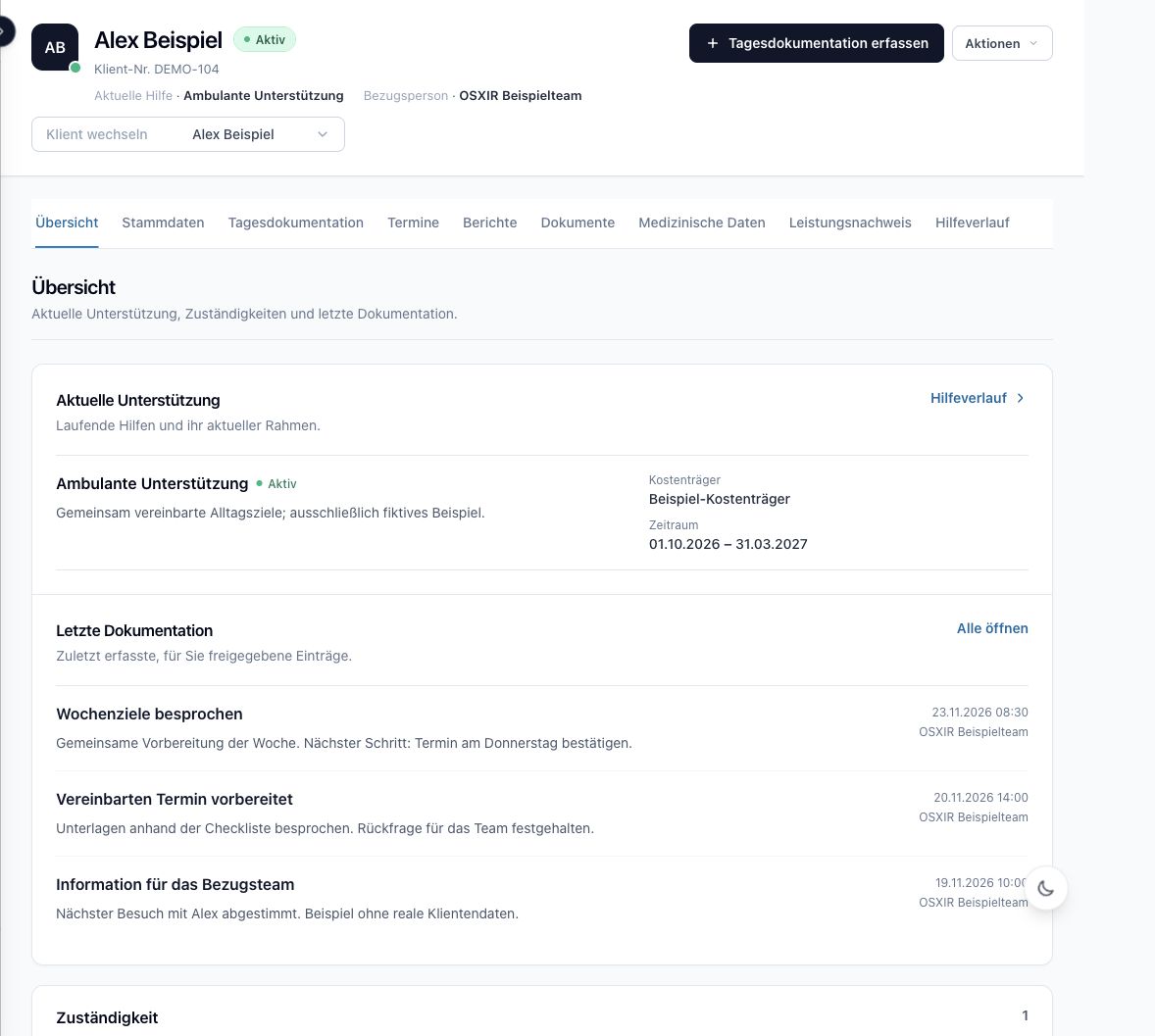
The overview connects the current support arrangement and responsible team to the same client.
Actual OHilfe interface · Entirely fictional sample data · Interface in GermanOpen the full-size screenshot3. Keep the history of support in context
Support arrangements change over time. OHilfe records the type, funding organisation, date range, status and notes against the client. The history lets a team understand an earlier period without treating today’s arrangement as the whole story.
For example, knowing that support ends in March helps the team plan a review or follow-up report. A date or funding organisation in this record does not create a contract or grant payment approval. The application supplies the record and workflow; the organisation defines the support and its approval requirements.
- Review which support applies to which period.
- Read assignments alongside their validity dates.
- Interpret daily notes within the agreed support framework.
4. Daily documentation: leave a useful next step
“Visit completed” tells the next colleague very little. A daily entry can hold its time, category, title, text and author. It can explain the observation, the action taken and what needs following up rather than merely recording that something happened.
In this case, the team prepared a meeting on 20 November and discussed weekly goals on 23 November. The later note says to confirm Thursday’s appointment. A colleague taking over can read that chronology in the case instead of searching separate message threads.
Sensitive daily entries can be marked and are subject to separate access checks. Notes should not be assumed visible to every colleague. Agree categories and writing conventions during setup so the content is useful to the next person.
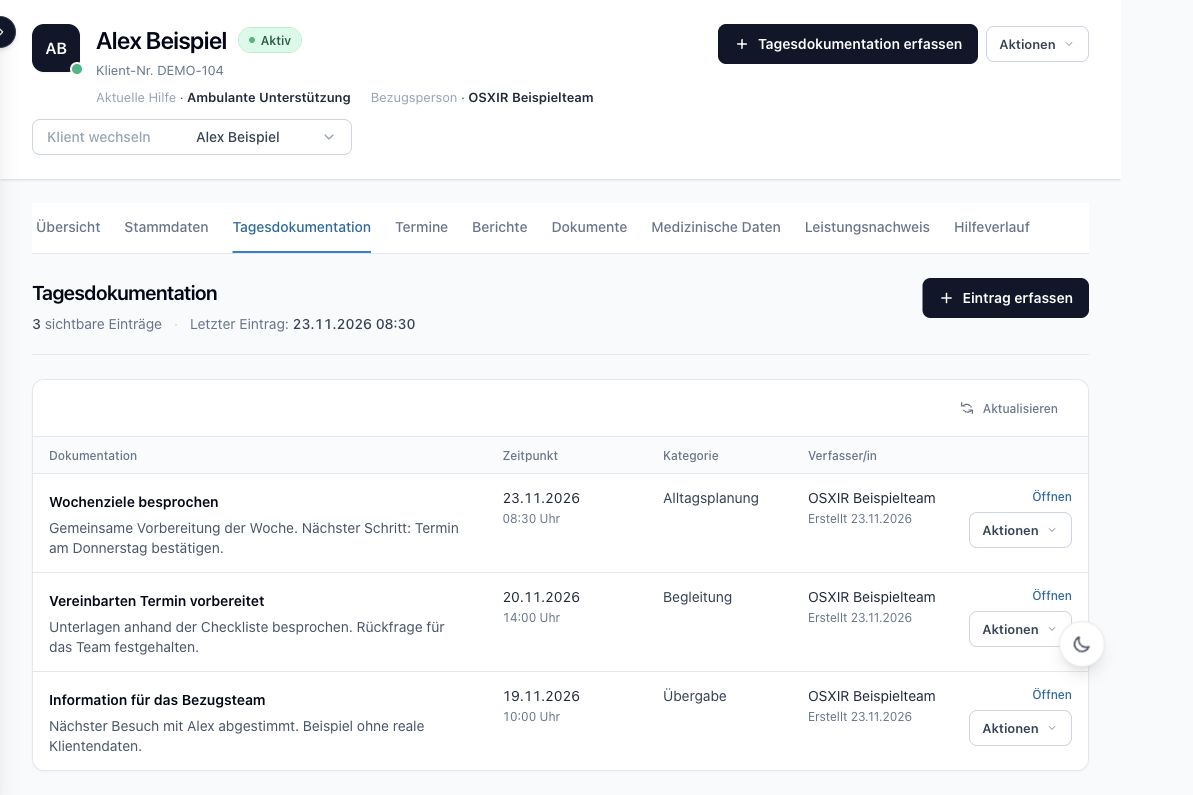
Each entry retains its date, title, content and author within the client’s record.
Actual OHilfe interface · Entirely fictional sample data · Interface in GermanOpen the full-size screenshot5. Follow appointments in the case and team calendar
An appointment has a title, type, start and finish, organiser, status and relevant details. Planned, confirmed, completed and cancelled appointments are distinguishable. The model supports overnight and multi-day intervals as well as ordinary meetings.
The case calendar focuses on one client. The wider appointment workspace helps teams review appointments across cases. Conflict checks, reminders and personal calendar subscriptions are available subject to configuration and access.
Alex’s Monday planning meeting is confirmed; Thursday’s visit is planned. This explains the follow-up in the daily note. A planned appointment alone is not evidence that a visit happened or that its duration has become approved working time.
6. Separate a working draft from a published report
Daily entries and a period report serve different purposes. Notes record events over time; a report is prepared for a defined period and purpose. OHilfe contains report types, report tasks and case-linked reports. Type configuration can include recurrence and reminder settings.
Reports can move from a draft to publication through the authorised action and continue with a later revision when needed. Draft, published, superseded and archived states are distinct. A working text should not be mistaken for the published version.
The example contains a November progress-report draft. Your team decides what belongs in the report and who reviews it. We do not present daily notes as automatically becoming a complete, legally compliant report; authorship, review and publication remain explicit responsibilities.
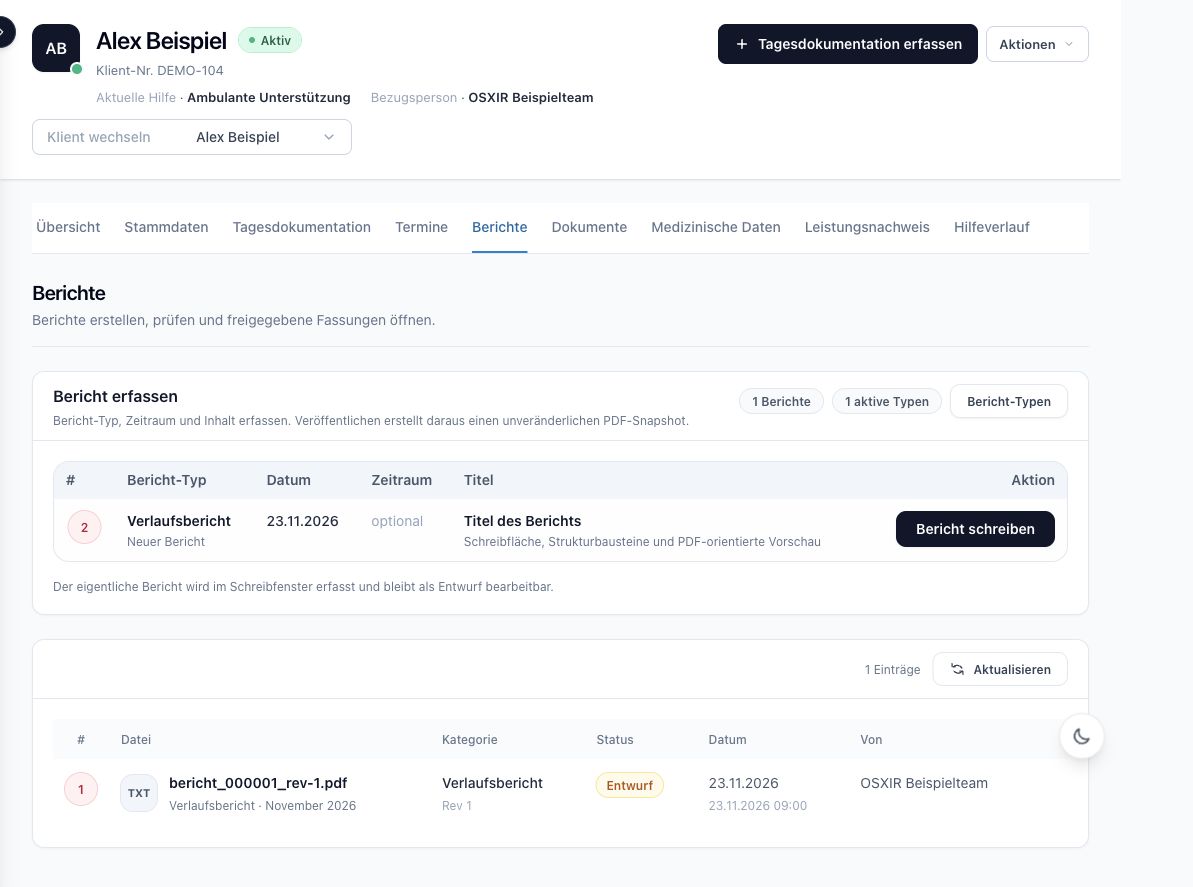
Reports have their own type, reporting period and status. The example is a November draft.
Actual OHilfe interface · Entirely fictional sample data · Interface in GermanOpen the full-size screenshot7. Read the service record together with its approval state
A daily note can describe a service without being its approved service proof. This area holds date, type, quantity, notes, creator and status. The approving person and approval time can also be recorded.
The example has an approved accompaniment record of 1.5 units on 20 November and a draft support record of one unit on 23 November. These are illustrative quantities; whether a unit represents an hour or another measure depends on your service definitions. Adding both together as approved work would be misleading.
Filtering and authorised CSV/PDF exports are implemented. A service proof is not automatically an invoice, a payment instruction or a guarantee of reimbursement. Any billing handoff must define which records and states are eligible and which external system will receive them.
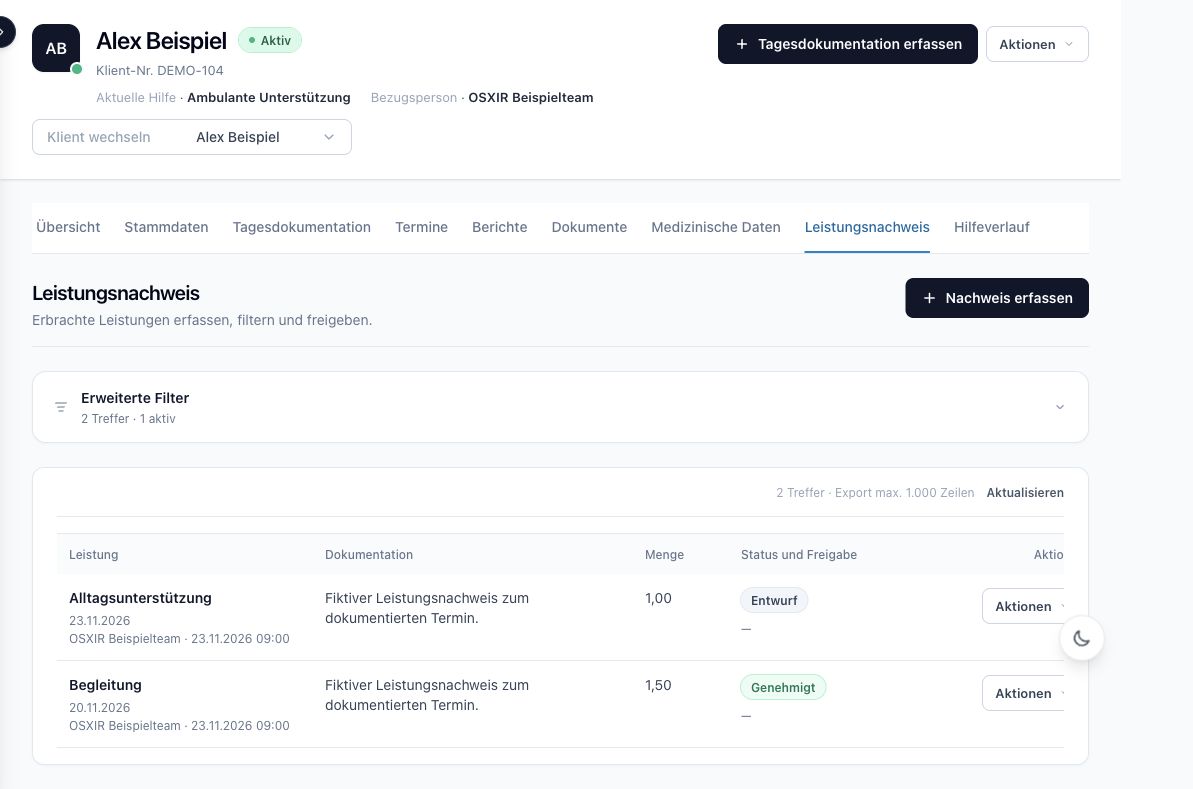
Date, service type, quantity and status stay together. A draft is distinct from an approved record.
Actual OHilfe interface · Entirely fictional sample data · Interface in GermanOpen the full-size screenshot8. One client record does not mean one access level
The documents area associates files with their client. Access and downloads depend on authorisation; possession of a screen link does not grant permission. Medical information has a separate section and permission scope, with entry type, content, validity dates and active/inactive status.
Medical records organise information your team is entitled to hold; OHilfe is not presented as a diagnosis or treatment recommendation tool. Sensitive content fields use the application’s encrypted storage mechanisms. Hosting, key management, backups, retention and staff access still require their own setup decisions. Encryption alone does not complete an organisation’s data protection responsibilities.
9. A shared case with clear responsibilities
The colleague taking over can now answer five practical questions: which support is active, who is responsible, what happened last, what comes next and which record remains a draft? OHilfe connects these answers around the client rather than squeezing every detail into one screen.
Employee leave and rotas remain in their People modules. OHilfe follows client-side service delivery. Where assignments, time entries and service records connect must be checked during setup; appointments should not be assumed to turn automatically into approved time or billed services.
10. What we agree before the first trial
We start with the journey of a real type of case: who records admission, who documents a visit, who publishes a report and who approves the service record? Those answers determine the fields and responsibilities to configure.
Test the agreed workflow with fictional or appropriately prepared data. The three-month free testing approach applies to products made available with an agreed scope. Adaptation requests can be collected during the trial; included work and additional scope are clarified together. Paid use requires separate approval, with monthly cancellation afterwards.
- Fields, support/service types and reporting periods.
- Responsible teams, valid assignments and sensitive-data access.
- Acceptance criteria for appointments, notes, reports and approvals.
- Migration scope, hosting, backups and support arrangements.
Test it with your own case workflow
Choose a workflow from admission through daily documentation to the end-of-period review. We will agree the necessary fields, roles and acceptance criteria together.
Explore People packages